In the previous post, we set up scorecards to display pass/fail check results on entity pages. Scorecards are great for binary compliance, but sometimes you want a more nuanced view.
Service Maturity gives you that. Instead of a flat list of pass/fail results, it introduces maturity rankings and categories into your quality checks. Teams can see where their service sits on a progression and what they need to do to reach the next level.
Maturity levels
The plugin defines four progression tiers:
| Level | Rank | What it means |
|---|---|---|
| Stone | 0 | Default level. The service is failing one or more Bronze-level checks. |
| Bronze | 1 | All checks with rank 1 are passing. |
| Silver | 2 | All Bronze and Silver (rank 1 + 2) checks are passing. |
| Gold | 3 | All Bronze, Silver, and Gold (rank 1 + 2 + 3) checks are passing. |
Each level builds on the previous one. A service reaches a maturity level only when all checks at that rank and below pass.
Maturity metadata on checks
For the maturity plugin to know which checks belong to which level, each check needs a metadata block with three properties:
| Property | Type | Description |
|---|---|---|
| category | string | Groups related checks together (e.g., “Documentation”, “Ownership”). The maturity scorecard uses this to organize checks visually. |
| rank | number | Determines the maturity tier: 1 = Bronze, 2 = Silver, 3 = Gold. |
| solution | string | Actionable guidance shown to teams when the check fails. Tells them exactly what to fix. |
Additionally, you can add a links field which is not part of metadata but is a separate field. It is an optional field and is a list of { title, url } objects pointing to relevant documentation or resources.
Scorecards vs. Service Maturity
Both components use the same underlying checks and facts. The difference is in how they present the results:
| Feature | Scorecards | Service Maturity |
|---|---|---|
| View | Flat list of pass/fail checks | Ranked maturity levels |
| Best for | Detailed compliance visibility | High-level maturity tracking |
| Motivation | Fix specific failing checks | Reach the next maturity level |
Many teams use both. Scorecards for the detailed view, Service Maturity for the summary.
Now that we know the concepts, let’s set it up.
Prerequisites
Before setting up Service Maturity, make sure you have:
- The Tech Insights backend plugin installed and configured (post #2)
- Fact retrievers running and collecting data (post #3)
- Checks defined (post #4)
- The frontend plugin installed (post #5)
Step 1: Install the maturity plugin
Install the maturity frontend package from your Backstage root directory:
yarn --cwd packages/app add @backstage-community/plugin-tech-insights-maturity
Since this plugin uses the new frontend system, there are no additional code changes needed beyond adding the package. Backstage discovers and wires the plugin automatically.
Note: New frontend system support was added via my PR. If your version doesn’t include it yet, follow the legacy frontend system setup guide.
Step 2: Add maturity metadata to your checks
We already have checks from post #4. Now we need to add the metadata block to each one. Here are examples for each maturity level:
Stone (no metadata needed)
If a check has no metadata block, a service failing it stays at Stone level. You don’t need to change anything for that.
Bronze (rank 1)
hasOwner:
  type: json-rules-engine
  name: Has Owner
  description: Entity has an owner defined in spec.owner. Every entity should have a clear owner.
  factIds:
    - entityOwnershipFactRetriever
  rule:
    conditions:
      all:
        - fact: hasOwner
          operator: equal
          value: true
  metadata:
    category: Ownership
    rank: 1
    solution: Add a spec.owner field to your catalog-info.yaml.
Silver (rank 2)
hasGroupOwner:
  type: json-rules-engine
  name: Has Group Owner
  description: Entity is owned by a group, not an individual. Team ownership ensures continuity.
  factIds:
    - entityOwnershipFactRetriever
  rule:
    conditions:
      all:
        - fact: hasGroupOwner
          operator: equal
          value: true
  metadata:
    category: Ownership
    rank: 2
    solution: Change spec.owner to a group reference instead of a user reference.
Gold (rank 3)
techDocsConfigured:
  type: json-rules-engine
  name: TechDocs Configured
  description: Entity has the backstage.io/techdocs-ref annotation. Add it to enable TechDocs.
  factIds:
    - techdocsFactRetriever
  rule:
    conditions:
      all:
        - fact: hasAnnotationBackstageIoTechdocsRef
          operator: equal
          value: true
  metadata:
    category: Documentation
    rank: 3
    solution: Add the backstage.io/techdocs-ref annotation to your catalog-info.yaml.
  links:
    - title: TechDocs Getting Started
      url: https://backstage.io/docs/features/techdocs/
The rank field is what drives the maturity levels. If any rank 1 check fails, the service stays at Stone.
What it looks like
Once the plugin is installed and your checks have maturity metadata, here’s what you get.
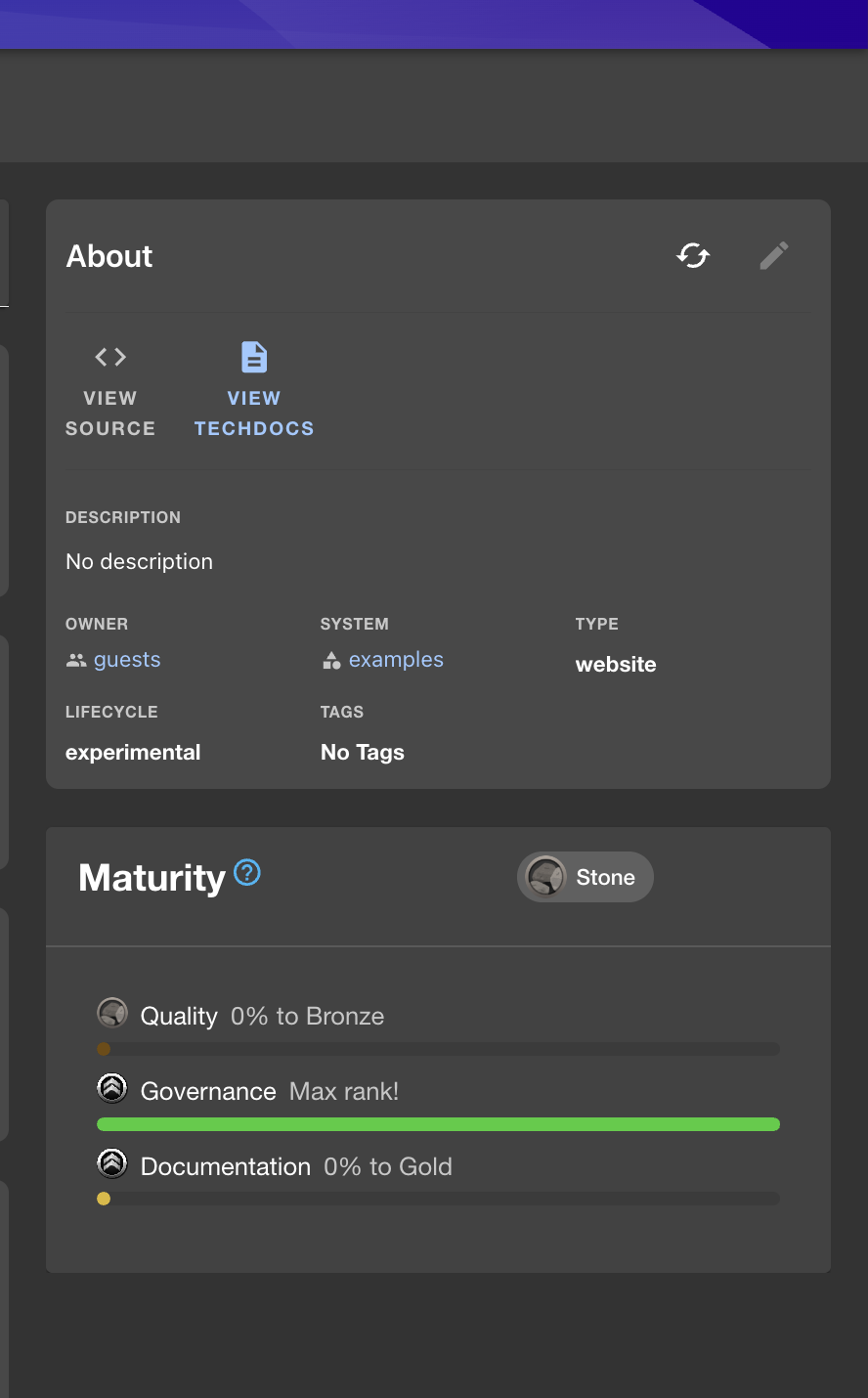
Maturity Summary Card on Entity Home Page
The entity overview page shows a compact maturity card. It tells you the current maturity level of a service at a glance without navigating to a separate page.
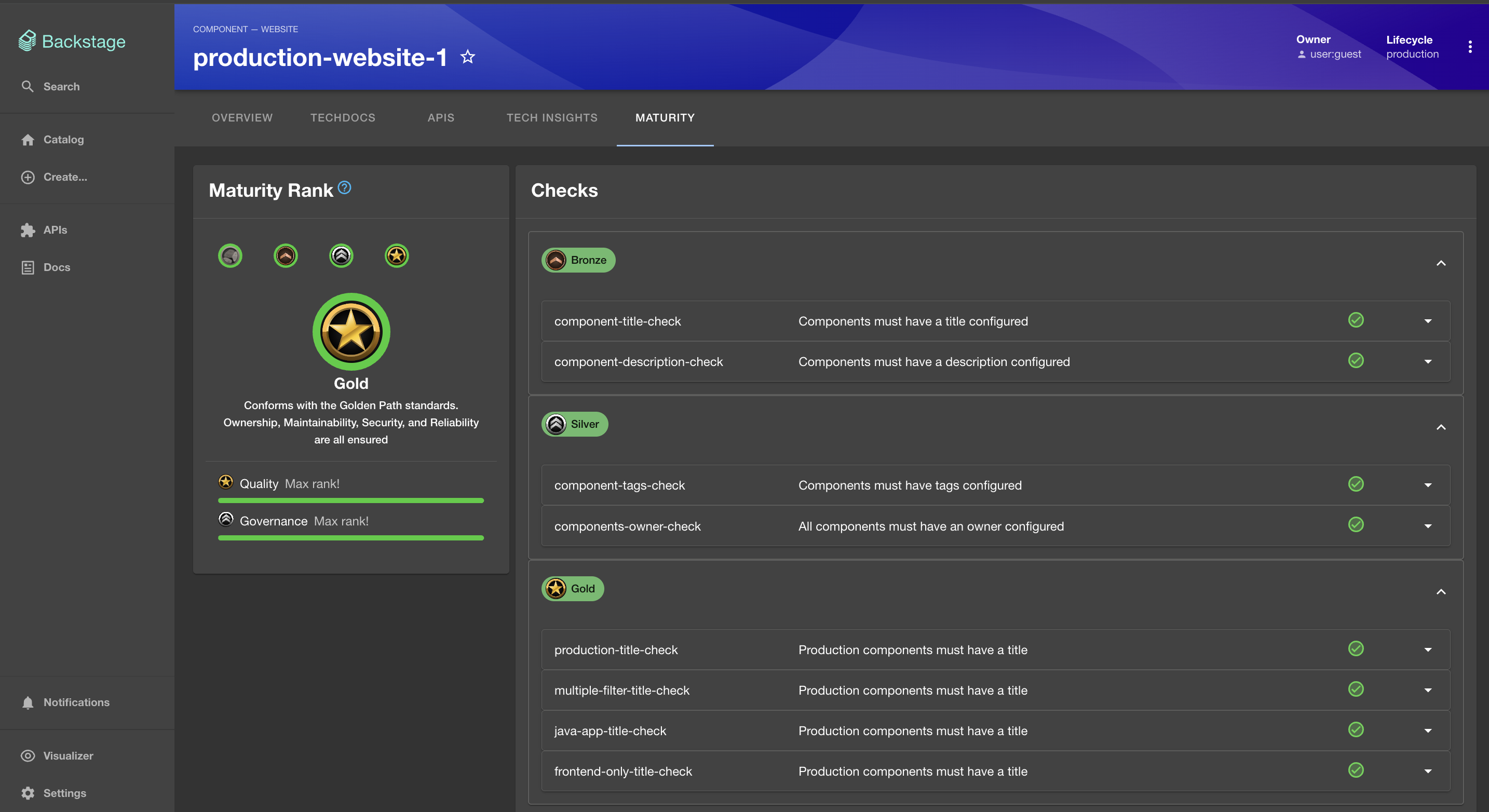
Maturity Summary Page (Gold Standard)
Clicking into the maturity tab on a Component entity gives you this detailed view. All checks are grouped by category, and you can see which ones are passing and what rank they belong to.
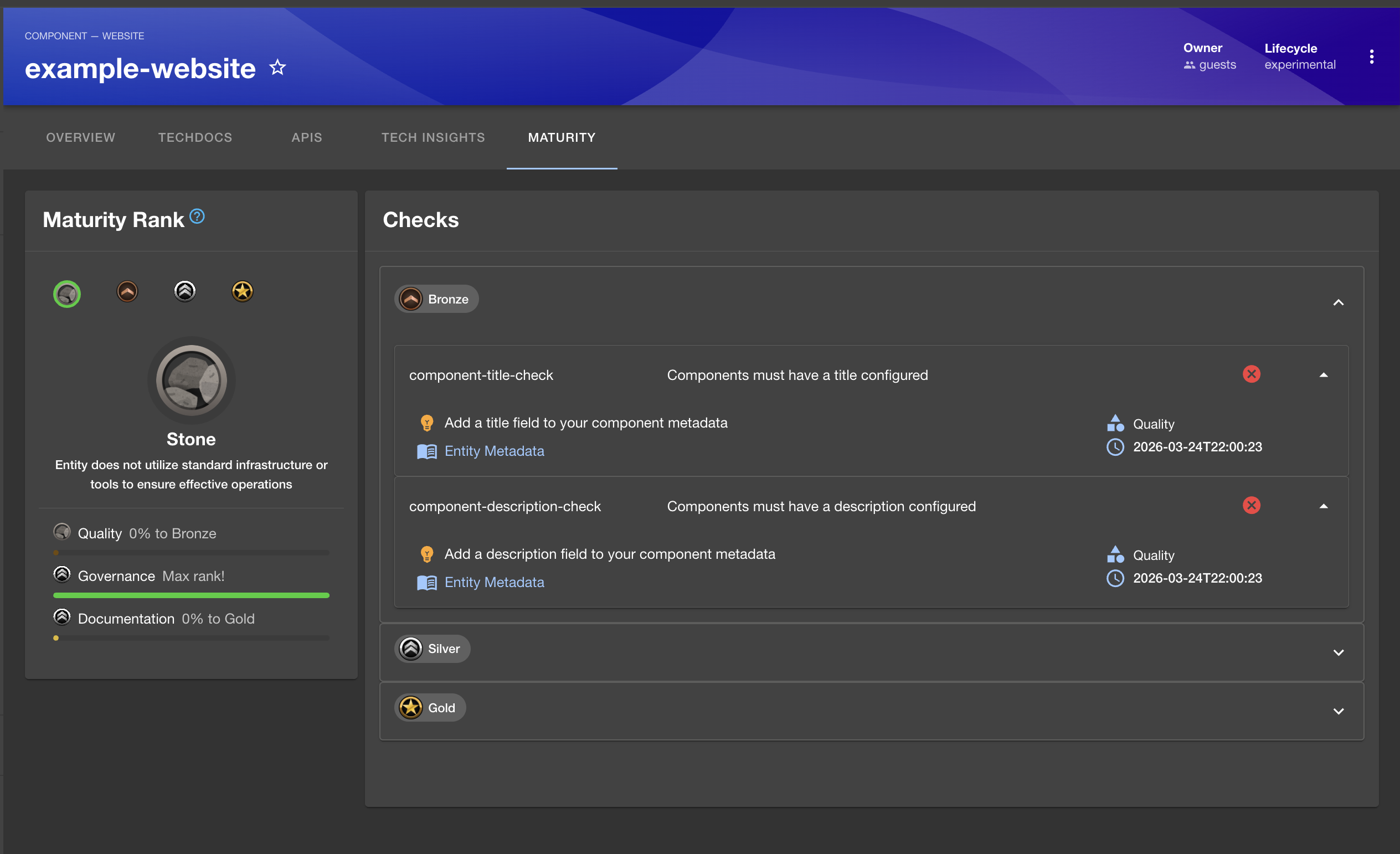
Maturity Summary Page (Detailed)
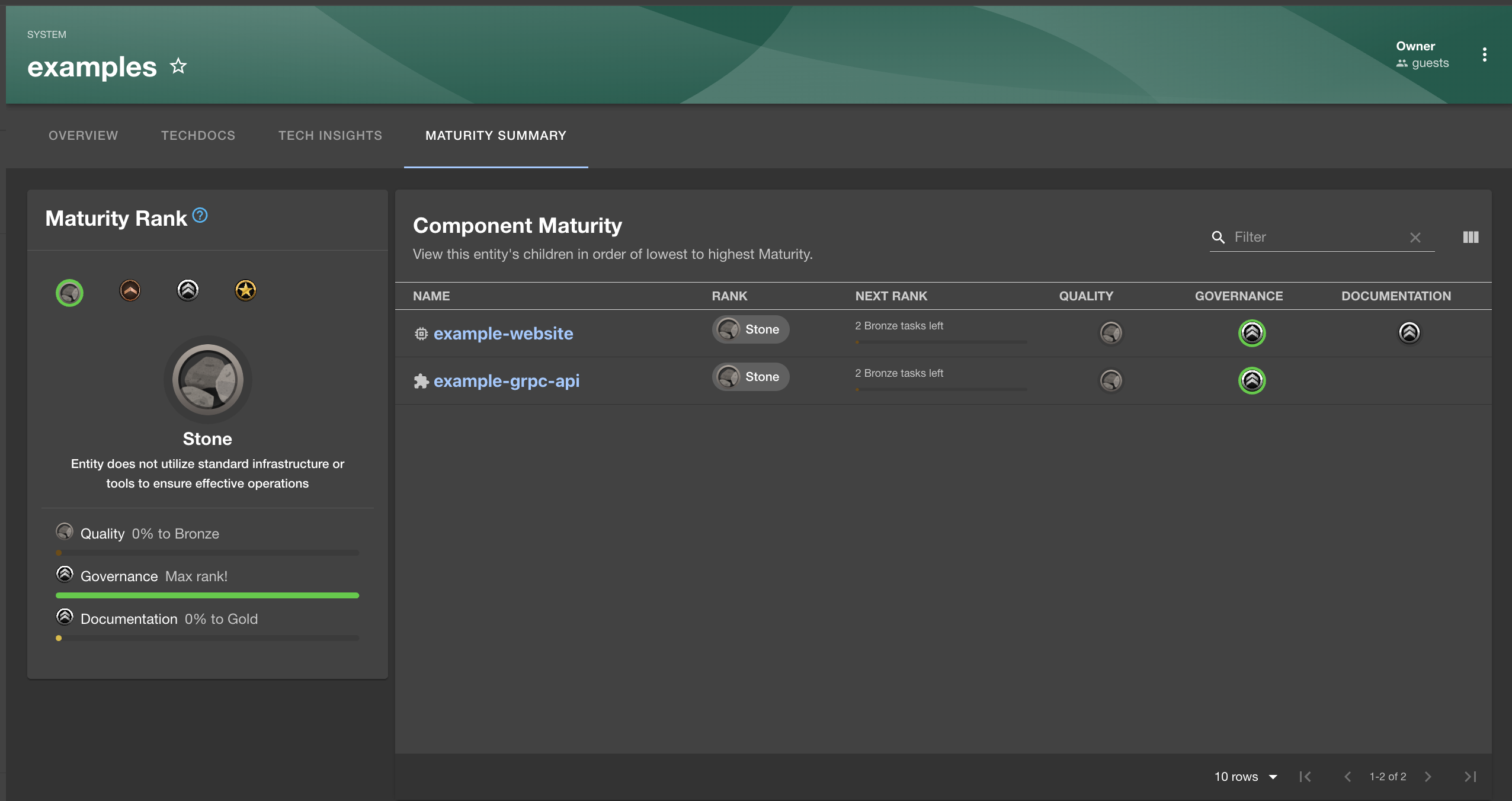
For System, Domain, or Group entities, the maturity page aggregates data across all owned entities. This gives leads and managers a rolled-up view of maturity across their area.
Maturity Page for Systems and Teams
This view shows the category of each check, and if a check is failing, it displays the solution along with a link to documentation so teams can resolve it themselves. It also shows when a given check last ran.
What’s next?
With the full frontend in place, we have covered the standard Tech Insights setup end to end. In the next post, we’ll go beyond the built-in retrievers and build custom fact retrievers to collect data from external systems.
Service Maturity adds a progression model on top of your existing checks. It gives teams a clear target to aim for. Combined with scorecards, you get both the detail and the big picture.